October 14, 2026 · 14 min read
Backend Latency Explained: p99, Tail Latency and Node.js
Here's a number from a test I ran while writing this post: a tiny Node.js API with a /health endpoint that answers in 2 ms at the median. Same server, same three seconds of traffic, and the p99 was 1,296 ms. Six hundred times slower.
Nothing crashed. No error showed up in any log. The average response time looked a bit high but not alarming. And yet more than a third of the requests in that window felt broken to whoever sent them.
That gap between "the dashboard looks fine" and "users say it's slow" is what this post is about: what backend latency really is, why the average hides the problems that matter, and what you can do about it in a Node.js or NestJS API. I'll use real measurements wherever I can instead of hand-waving.
What is latency, really?
Latency is the time between asking for something and getting it. For a backend API, that's usually measured from the moment a request arrives until the last byte of the response leaves.
The trap is treating it as one number. Latency isn't a number, it's a distribution. Every request takes a slightly different amount of time, and when you plot thousands of them, you get a shape like this:
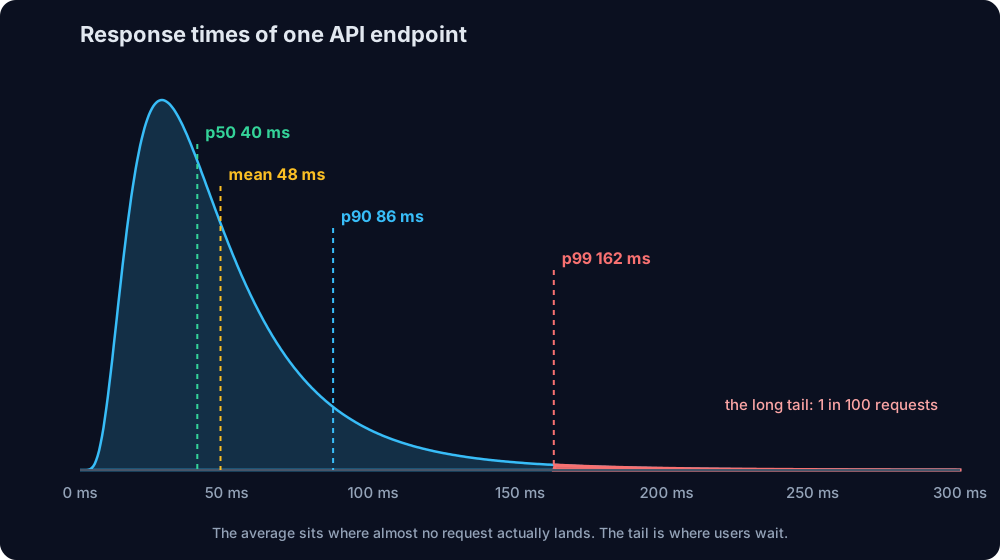
Most requests are bunched up on the left. Then there's a long, thin tail stretching to the right: requests that hit a cold cache, a garbage collection pause, a slow database query, a busy neighbor on the same machine. That tail is where your users actually suffer.
Why average response time lies
The average (the mean) adds every response time and divides by the count. The problem is that one very slow request and a hundred fast ones average out to "pretty fast", which describes nobody's experience.
Percentiles are more honest:
- p50 (the median): half of the requests are faster than this. It's what a typical request feels like.
- p90: 9 out of 10 requests are faster.
- p99: 99 out of 100 are faster. This is your tail latency.
- p99.9: one in a thousand is slower. At scale, that's still a lot of people.
If you only keep one latency metric on your dashboard, make it p99, not the average.
"p99 is rare, so who cares?"
This is the most common objection, and it's wrong in two ways.
First, users make many requests. A single page load often triggers 20 to 50 API calls. If each one has a 1% chance of hitting the p99, then the chance that a page load hits at least one slow call is 1 - 0.99^50, about 40%. Your "rare" slow request shows up in almost half of all page loads.
Second, backends fan out. One incoming request often calls several services, databases or caches in parallel, and it can only respond when the slowest of them is done:
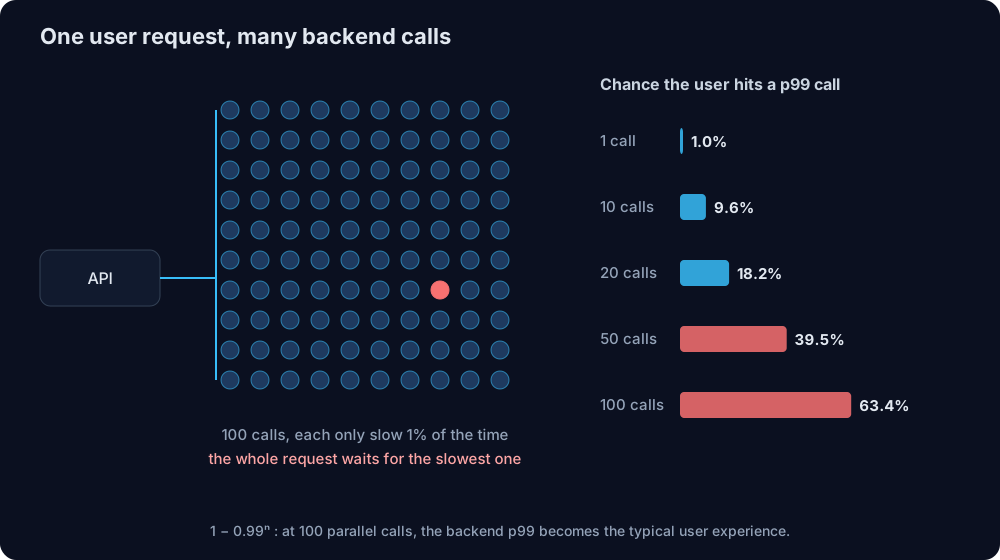
With 100 parallel calls, 63% of user requests wait on at least one p99 response. At that point, the p99 of your dependencies is the typical experience of your users. Google described this effect in a well-known paper called "The Tail at Scale", and it's the reason large systems obsess over tail latency.
Where backend latency comes from
When an endpoint is slow, it's usually one of four things. It helps to know which one before you start optimizing.
1. Physics: the speed of light is a hard limit
Light in optical fiber travels at roughly 200,000 km per second, about two thirds of its speed in a vacuum. That sounds instant until you do the math for real distances. Here are the best-case numbers from Casablanca, assuming a perfectly straight fiber cable (real routes are always longer):
| Server in | Distance | Minimum round trip | New HTTPS connection (3 round trips) |
|---|---|---|---|
| Paris | 1,888 km | 18.9 ms | ~57 ms |
| Frankfurt | 2,269 km | 22.7 ms | ~68 ms |
| N. Virginia (us-east-1) | 6,138 km | 61.4 ms | ~184 ms |
| Sydney | 18,057 km | 180.6 ms | ~542 ms |
Why three round trips for a new connection? One for the TCP handshake, one for the TLS 1.3 handshake, and one for the actual HTTP request and response. No amount of code optimization gets you below those numbers. The only fixes are moving the server closer to the user, or not opening new connections (more on that later).
This is also why picking us-east-1 by default can quietly add 150+ ms for users in North Africa or Europe.
2. Queueing: the hockey stick
Every server has a limit on how much it can process at once. When requests arrive faster than they can be handled, they wait in a queue, and queues behave in a very non-intuitive way:
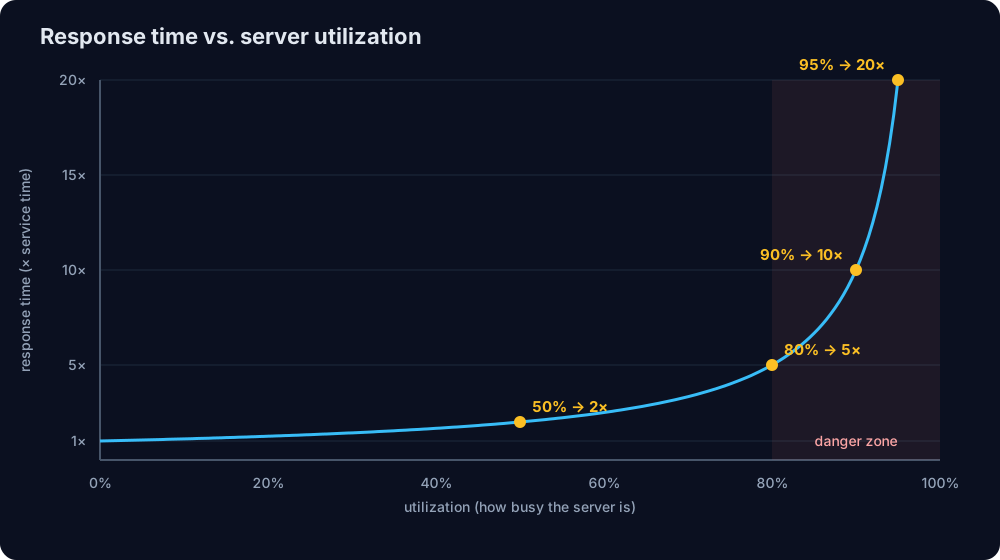
In the classic queueing model, response time is the service time divided by (1 - utilization). At 50% busy, requests take twice as long as the work itself. At 90%, ten times. At 95%, twenty times. The curve stays flat for a long time and then goes vertical.
The practical lesson: a server at 90% CPU isn't "using its resources well", it's already slow. Scale out before you get there, and set autoscaling thresholds around 60 to 70%, not 90%.
3. The event loop: Node.js's special weakness
Node.js handles every request on a single thread. That's great for I/O-heavy APIs, but it means one slow piece of synchronous code doesn't just slow down its own request. It freezes every request on that process.
Here's a rare but very real example: a regular expression. This pattern looks harmless and might be used to validate input:
const pattern = /^(a+)+$/;
pattern.test('a'.repeat(28) + '!');
The nested + makes the regex engine try an exponential number of ways to match before giving up. This is called catastrophic backtracking, and it's the basis of ReDoS (regular expression denial of service) attacks. Here's how long that test() call took on my machine with Node.js 22:
| Input length | Time blocked |
|---|---|
| 22 characters | 78 ms |
| 24 characters | 321 ms |
| 26 characters | 1,290 ms |
| 28 characters | 5,087 ms |
Every two extra characters make it about four times slower. One user sending a 28-character string blocks your whole API for five seconds.
To see what that does to other users, I ran a small experiment: a Node.js server with a fast /health endpoint and a /validate endpoint that runs the regex on a 26-character input. A client sent one /health request every 10 ms for three seconds, and a single /validate request at the one-second mark. The results for the /health requests:
requests:       300
p50:            2.1 ms
p90:            1,027.5 ms
p99:            1,296.0 ms
over 100 ms:    123 requests
One bad request, and 123 innocent requests that had nothing to do with it each waited over a second. That's the 1,296 ms p99 from the start of this post.
The fix for the regex is to remove the ambiguity: /^a+$/ matches exactly the same strings and ran in 0.01 ms on the same input. For user-supplied patterns, V8 also has an optional linear-time engine (enabled with --enable-experimental-regexp-engine and the l flag) that ran the original pattern in 0.03 ms. More generally, keep heavy synchronous work (big JSON.parse calls, image processing, bcrypt with the sync API, crypto) off the main thread, and use worker threads or a queue instead.
You can watch the event loop directly with Node's built-in perf_hooks, no library needed:
import { monitorEventLoopDelay } from 'node:perf_hooks';

const histogram = monitorEventLoopDelay({ resolution: 10 });
histogram.enable();

setInterval(() => {
  const ms = (ns: number) => (ns / 1e6).toFixed(1);
  console.log(
    `event loop delay p50=${ms(histogram.percentile(50))}ms ` +
      `p99=${ms(histogram.percentile(99))}ms max=${ms(histogram.max)}ms`,
  );
  histogram.reset();
}, 10_000).unref();
If the event loop p99 regularly climbs above a few tens of milliseconds, something is blocking it, and every request on that process is paying for it.
4. Dependencies: the database, the cache and the other services
Usually the biggest share of backend latency is waiting for other systems: a slow SQL query, a missing index, an N+1 query pattern, a third-party API having a bad day. These deserve their own post, but the measurement advice below will at least tell you which dependency is to blame.
How to measure latency correctly
Use histograms, not averages
In a NestJS API, an interceptor is a convenient place to time each request. Here it is with prom-client, the standard Prometheus library for Node.js:
import { CallHandler, ExecutionContext, Injectable, NestInterceptor } from '@nestjs/common';
import type { Request } from 'express';
import { Histogram } from 'prom-client';
import { finalize } from 'rxjs';

const httpDuration = new Histogram({
  name: 'http_request_duration_seconds',
  help: 'HTTP request duration in seconds',
  labelNames: ['method', 'route'],
  buckets: [0.005, 0.01, 0.025, 0.05, 0.1, 0.25, 0.5, 1, 2.5, 5],
});

@Injectable()
export class LatencyInterceptor implements NestInterceptor {
  intercept(context: ExecutionContext, next: CallHandler) {
    const req = context.switchToHttp().getRequest<Request>();
    const end = httpDuration.startTimer({ method: req.method, route: req.route?.path ?? 'unknown' });
    return next.handle().pipe(finalize(() => end()));
  }
}
Two details matter here. Label by the route pattern (/orders/:id), not the actual URL (/orders/8231), or you'll create a new time series for every ID. And choose bucket boundaries around your real targets: if your goal is "p99 under 300 ms", you want buckets near 250 and 500 ms.
Then let Prometheus (or Grafana) compute the percentile:
histogram_quantile(0.99, sum by (le, route) (rate(http_request_duration_seconds_bucket[5m])))Keep in mind that interceptors run after middleware and guards, so this measures the handler and everything after it. For the full picture, also measure at the load balancer or API gateway.
Watch out for coordinated omission
This is the measurement mistake almost nobody talks about, and I fell into it myself while preparing this post.
Most simple load-testing scripts work like this: send a request, wait for the response, send the next one. That seems reasonable, but think about what happens during a stall. While the server is frozen, the load tester is also waiting, so it stops sending requests. It records one slow request instead of the hundred that real users would have sent during that time. The tool and the server are "coordinating" to hide the problem.
I ran both styles of client against the same server with the same regex stall:
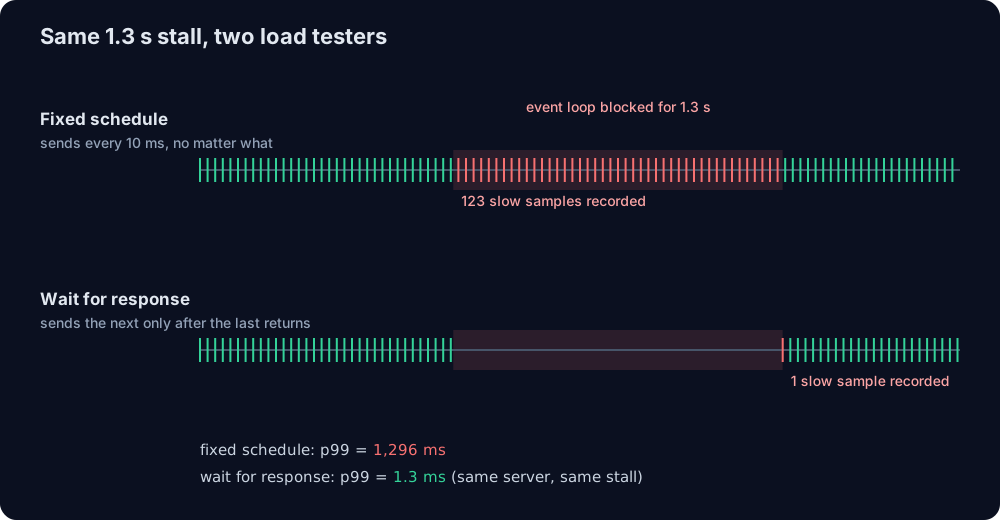
fixed schedule (every 10 ms):   p99 = 1,296 ms   (123 slow samples)
wait for each response:         p99 = 1.3 ms     (1 slow sample)
Same server, same 1.3-second freeze, and one report says everything is perfect. Real users don't wait politely for each other, so the fixed-schedule number is the true one.
The fix is to use an open model load test, where requests are sent at a fixed rate no matter how the server responds. In k6, that's the constant-arrival-rate executor:
import http from 'k6/http';

export const options = {
  scenarios: {
    steady_traffic: {
      executor: 'constant-arrival-rate',
      rate: 100, // requests per second, regardless of response time
      timeUnit: '1s',
      duration: '1m',
      preAllocatedVUs: 50,
      maxVUs: 500,
    },
  },
  thresholds: {
    http_req_duration: ['p(99)<300'], // fail the test if p99 goes over 300 ms
  },
};

export default function () {
  http.get('http://localhost:3000/orders');
}
wrk2 and Gatling's open injection profiles work the same way. If your load tests only use a fixed number of "virtual users" that wait for each response, your tail latency numbers are probably too optimistic.
How to reduce tail latency
Set timeouts and deadlines on every outgoing call
A call without a timeout can turn one slow dependency into a pile of stuck requests. Modern Node.js makes this a one-liner:
const res = await fetch(`${INVENTORY_URL}/stock/${sku}`, {
  signal: AbortSignal.timeout(200),
});
Better still, pass a deadline down the chain. If the client gave you 1 second in total and you've used 700 ms, the next call should get at most 300 ms, not its usual default:
export function remainingSignal(deadline: number, parent?: AbortSignal): AbortSignal {
  const timeout = AbortSignal.timeout(Math.max(0, deadline - Date.now()));
  return parent ? AbortSignal.any([parent, timeout]) : timeout;
}

// at the start of the request
const deadline = Date.now() + 1000;

// for every call along the way
await fetch(url, { signal: remainingSignal(deadline) });
There's no point spending 2 seconds on a sub-request whose result the client stopped waiting for a second ago.
Hedge slow requests
This is a trick from the same Google paper, and it's surprisingly effective. If a request hasn't answered by the time it reaches your usual p95, send a second copy to another replica and use whichever answers first:
export async function hedged<T>(
  call: (signal: AbortSignal) => Promise<T>,
  hedgeAfterMs: number,
): Promise<T> {
  const first = new AbortController();
  const second = new AbortController();
  let timer: NodeJS.Timeout | undefined;

  const backup = new Promise<T>((resolve, reject) => {
    timer = setTimeout(() => call(second.signal).then(resolve, reject), hedgeAfterMs);
  });

  try {
    return await Promise.any([call(first.signal), backup]);
  } finally {
    clearTimeout(timer);
    first.abort(); // cancel whichever one lost
    second.abort();
  }
}

// usage: hedge after roughly the p95 of this dependency
const product = await hedged(
  (signal) => fetch(`${CATALOG_URL}/products/${id}`, { signal }).then((r) => r.json()),
  80,
);
Because the backup only fires for the slowest ~5% of requests, the extra load is about 5%, while the tail shrinks dramatically. One important rule: only hedge requests that are safe to send twice, like reads. For writes, you need an idempotency key first. I wrote about that in Idempotent POST Endpoints in NestJS.
Reuse connections
Remember the three round trips for a new HTTPS connection? Keeping connections open removes two of them. Since Node.js 19, the default HTTP agent has keepAlive turned on, so make sure you're on a recent version, and check that your database driver uses a connection pool with a sensible minimum size so the first requests after a quiet period don't pay for new connections.
Cache, but watch the misses
Caching is the classic latency fix, but it changes the shape of your distribution: cache hits become very fast, misses stay slow. Your p50 drops beautifully while your p99 stays exactly where it was. Always check the tail after adding a cache, not just the median.
Keep headroom
Go back to the queueing curve. Running at 60% utilization instead of 90% doesn't just give you room for traffic spikes, it can cut your response times several times over. Extra capacity is often the cheapest latency optimization there is.
Backend latency FAQ
What is a good p99 latency for an API?
It depends on the endpoint, but common targets are under 100 ms at p50 and under 300 to 500 ms at p99 for user-facing APIs. Internal services that sit behind a fan-out should aim much lower, because their tail gets multiplied.
What's the difference between latency and response time?
Strictly speaking, latency is the time a request spends waiting (in the network or in a queue), and response time is the total time including the actual processing. In everyday backend work, people use both terms for "how long until I got the answer".
Why is my p99 so much higher than my average?
Because averages hide outliers. The usual causes of a high p99 are garbage collection pauses, a blocked event loop, cold caches, slow database queries on specific inputs, lock contention and servers running close to full capacity.
Is latency the same as throughput?
No. Throughput is how many requests you handle per second. Latency is how long each one takes. You can have high throughput and terrible latency at the same time, which is exactly what happens on the right side of the queueing curve.
Wrapping up
If you remember one thing from this post: stop looking at the average. Put p50, p99 and the event loop delay on your dashboard, use an open-model load test so stalls actually show up, and treat your p99 as what a large share of your users experience every day, because, thanks to fan-out and repeated requests, it is.
The regex experiment is still the one that surprises me most. One line of code, no errors anywhere, and a third of all requests quietly took over a second. The tail is where the interesting bugs live.